
Introduction
A program is a passive file of instructions on disk. A process is a program in execution: the code together with a program counter, register values, a stack, a heap, open files and everything else the OS must remember to stop it and later continue it exactly where it left off. Two users running the same editor have one program and two processes.
The process is the unit the OS schedules, protects and accounts for. Scheduling, synchronization, deadlock and memory management all build on the life cycle described here: a process is created, waits for the CPU, runs, waits for I/O, runs again, and finally terminates. The kernel records all of this in one data structure per process, the process control block.
Prerequisites
- Operating System Structure and System Calls: user and kernel mode, traps, interrupts and the timer.
Core concepts
The process in memory
| Region | Contents | Grows |
|---|---|---|
| Text | Machine code (often shared, read-only) | Fixed |
| Data | Global and static variables | Fixed |
| Heap | Memory from malloc and new | Upward, toward the stack |
| Stack | Activation records: parameters, return addresses, local variables | Downward, toward the heap |
The gap between heap and stack is what lets both grow. A stack overflow is the stack running into something it should not.
The process control block (PCB)
The PCB (called a task structure in Linux) holds everything the kernel needs about one process:
- Identification: process ID, parent's ID, user ID.
- CPU state: program counter, general registers, stack pointer, status word. Saved here when the process leaves the CPU.
- Scheduling information: state, priority, pointers into scheduling queues, CPU time used.
- Memory-management information: base and limit registers or the page-table pointer.
- I/O and file information: the open-file table, pending I/O requests.
- Accounting: CPU time, time limits.
The PCB is kernel data. It lives in protected kernel memory, not in user-accessible process memory, so a process cannot change its own priority or page table by writing memory.
The five-state model
| State | Meaning |
|---|---|
| New | Being created; PCB being set up; not yet admitted |
| Ready | In memory, able to run, waiting only for a CPU |
| Running | Executing on a CPU |
| Waiting (blocked) | Cannot run until an event happens: I/O completion, a signal, a semaphore |
| Terminated | Finished; the parent has not yet collected its exit status, or the kernel is freeing its resources |
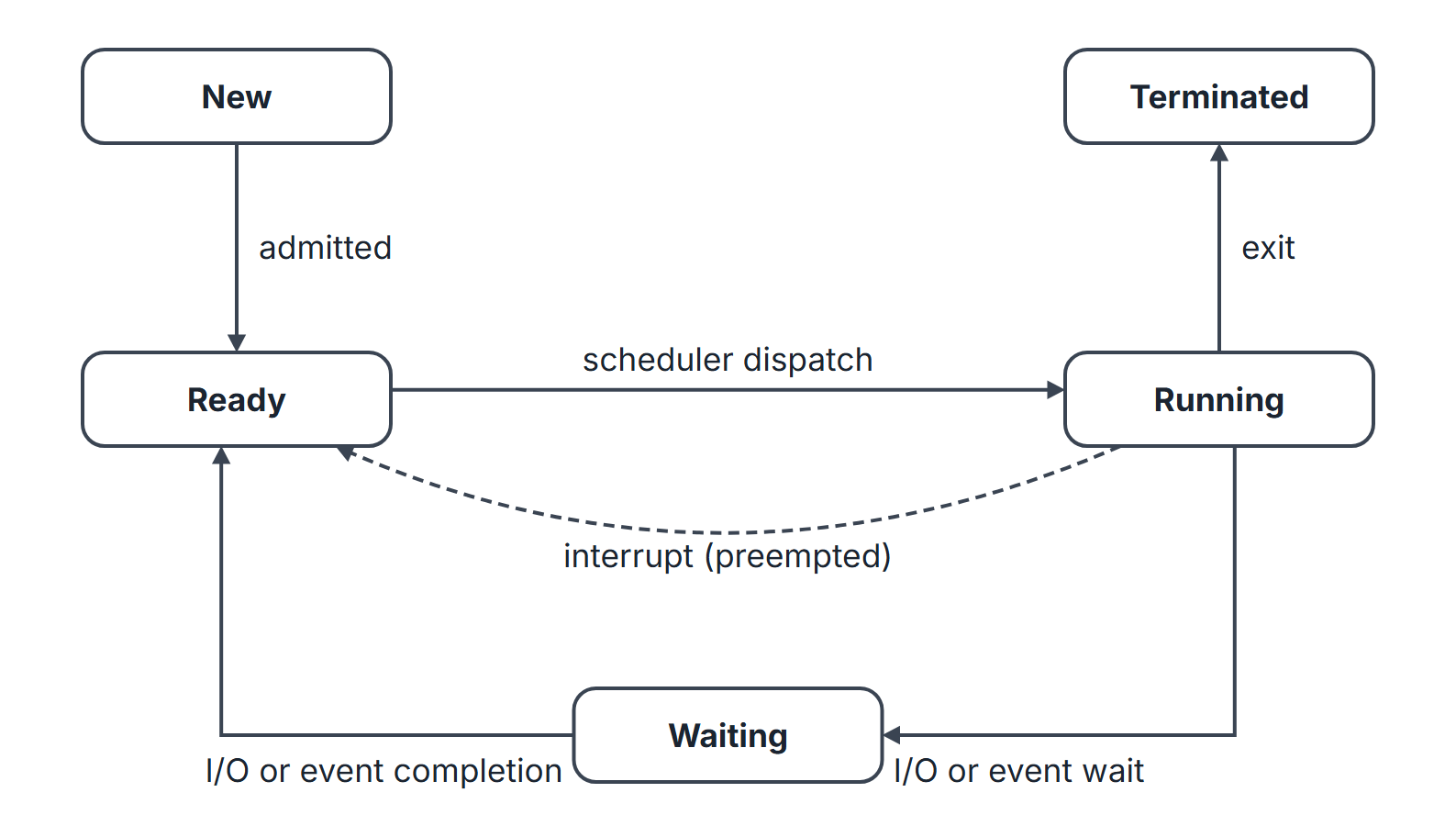
Legal transitions.
| From | To | Cause |
|---|---|---|
| New | Ready | Admitted by the long-term scheduler |
| Ready | Running | Dispatched by the short-term scheduler |
| Running | Ready | Preempted: timer interrupt or a higher-priority process became ready |
| Running | Waiting | Process asked for I/O or waits on an event |
| Waiting | Ready | The I/O or event completed |
| Running | Terminated | exit or a fatal error |
Impossible transitions. Waiting to Running directly (a woken process must go through Ready and be chosen), Ready to Waiting (only a running process can issue the request that blocks it), and New to Running. In a non-preemptive system the Running to Ready edge is used only when a process yields voluntarily; it is never forced.
Counting limits on CPUs. At most processes are Running at any instant; Ready and Waiting have no fixed limit. With one CPU and processes in memory, at most one is Running and up to can be Ready or Waiting.
Suspended states
When memory is short, the medium-term scheduler swaps a whole process out to disk. That adds two states, giving the seven-state model: Ready-suspended (could run if it were in memory) and Blocked-suspended (waiting for an event and swapped out). A blocked-suspended process whose event occurs becomes ready-suspended; it becomes ready again when it is swapped in.
Schedulers
| Scheduler | Chooses | Runs | Controls |
|---|---|---|---|
| Long-term (job) | Which new jobs enter memory | Rarely (seconds or minutes) | Degree of multiprogramming, mix of CPU-bound and I/O-bound jobs |
| Short-term (CPU) | Which ready process gets the CPU | Very often (milliseconds) | Response time; must be fast |
| Medium-term | Which process to swap out or in | Occasionally | Memory pressure, thrashing |
The degree of multiprogramming is the number of processes in memory. An I/O-bound process spends most time waiting for I/O and has short CPU bursts; a CPU-bound process has long bursts. A good long-term scheduler mixes both, so that the CPU and the devices are busy at the same time.
Context switch
Switching the CPU from process A to process B means saving A's CPU state into A's PCB and loading B's state from B's PCB, plus switching the address space (page-table base register and, on many machines, flushing or tagging the TLB). The switch does no useful work for either process: it is pure overhead, typically microseconds, and it grows with the amount of hardware state to save.
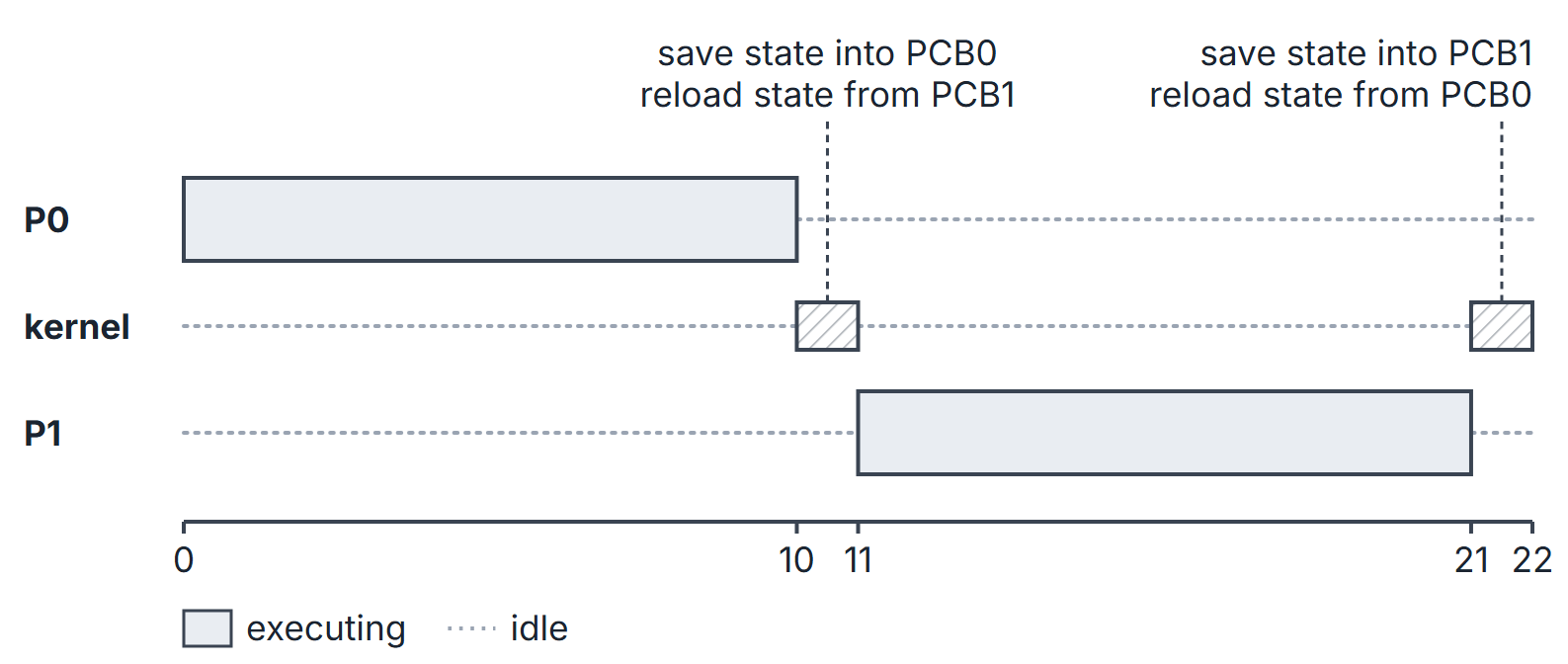
Mode switch versus context switch. System calls and interrupts from user mode enter kernel mode; they may return to the same process or trigger a context switch. A context switch changes the running process/thread and executes kernel scheduling code, but need not itself change privilege mode if the CPU is already in kernel mode.
Termination, zombies and orphans
When a process calls exit, its memory and files are released but a small entry (PID and exit status) stays until the parent calls wait. Until then the dead child is a zombie. If the parent terminates first, the child becomes an orphan; on UNIX systems it is adopted by init (PID 1) or a designated subreaper, which collects it when it dies.
Mathematical explanation
CPU utilization with multiprogramming
Tanenbaum's simple probabilistic model assumes each of processes in memory independently spends a fraction of its time waiting for I/O. The CPU is idle only when all are waiting at once, so
This is an approximation: it ignores that processes compete for the one CPU, so it is optimistic for large . It still explains why adding processes raises utilization with diminishing returns.
Context-switch efficiency
If each process runs for a quantum and every switch costs , the fraction of CPU time doing useful work is
assuming every quantum is fully used and then followed by a switch.
Worked examples
Utilization from the multiprogramming model
With (processes wait 80% of the time) and : , about 59%.
How many processes are needed for at least 90% utilization? We need . Since and , the answer is .
Counting state transitions
A process runs alone on one CPU with the burst pattern CPU 3, I/O 2, CPU 4, I/O 1, CPU 2, with no preemption. It enters Ready once on admission, then: Ready to Running 3 times (one per CPU burst), Running to Waiting 2 times (one per I/O burst), Waiting to Ready 2 times, Running to Terminated once. Its turnaround time, measured from admission, is units, since nothing else competes.
Switch overhead
With ms and ms, : about 9.1% of CPU time is lost to switching. Cutting the quantum to ms gives , so a third of the time is overhead. This is why the quantum must be large compared with the switch time.
Important properties and observations
- A process is in exactly one state at a time; the PCB records which.
- Being in memory is not the same as being ready: a waiting process is in memory but cannot run.
- Only the running process can block itself; only an interrupt or the scheduler moves Running to Ready.
- Context-switch time is overhead that every scheduling metric pays; when a switch cost is given, add it between consecutive runs.
- The long-term scheduler controls the degree of multiprogramming; the medium-term scheduler reduces it temporarily by swapping.
Common misconceptions.
- "A waiting process can be dispatched as soon as its I/O completes." It first becomes Ready.
- "Swapping is the same as a context switch." Swapping moves a whole process between memory and disk; a context switch only changes which process the CPU runs.
- "A zombie still holds its memory." Only its process-table entry remains.
GATE examination perspective
- Legal and illegal transitions. Expect lists of transitions to classify. Waiting to Running and Ready to Waiting are illegal in the standard model.
- Preemptive or not. An involuntary Running-to-Ready transition identifies preemption; it may follow a timer interrupt or another interrupt that makes a higher-priority process ready.
- Counting processes in states. On CPUs at most are Running; the minimum in Ready or Waiting is 0.
- Overheads. Add the switch time between consecutive runs of different processes; read whether a switch is also charged at time 0 or after the last process (state the convention you use).
- PCB contents. The PCB stores registers, PC, state, scheduling and memory information; it does not store the process's code or heap.
- Zombie and orphan. Zombie: child dead, parent has not waited. Orphan: parent dead, child alive.
Summary
Sources
- A. Silberschatz, P. B. Galvin, G. Gagne, Operating System Concepts, 10th ed., Wiley: Chapter 3 (3.1 Process Concept, 3.2 Process Scheduling, 3.3 Operations on Processes).
- A. S. Tanenbaum, H. Bos, Modern Operating Systems, 4th ed., Pearson: Section 2.1 (2.1.5 Process States, 2.1.6 Implementation of Processes, 2.1.7 Modeling Multiprogramming).