
Introduction
The HyperText Transfer Protocol carries the Web. A client (browser) sends a request naming a resource and a method; the server sends back a response with a status code, header fields and usually a body. HTTP/1.1 runs over TCP, by default on port 80 (443 for HTTPS, HTTP over TLS). It is stateless: each request is understood on its own, and anything that must persist between requests, such as a login, is carried in header fields like cookies.
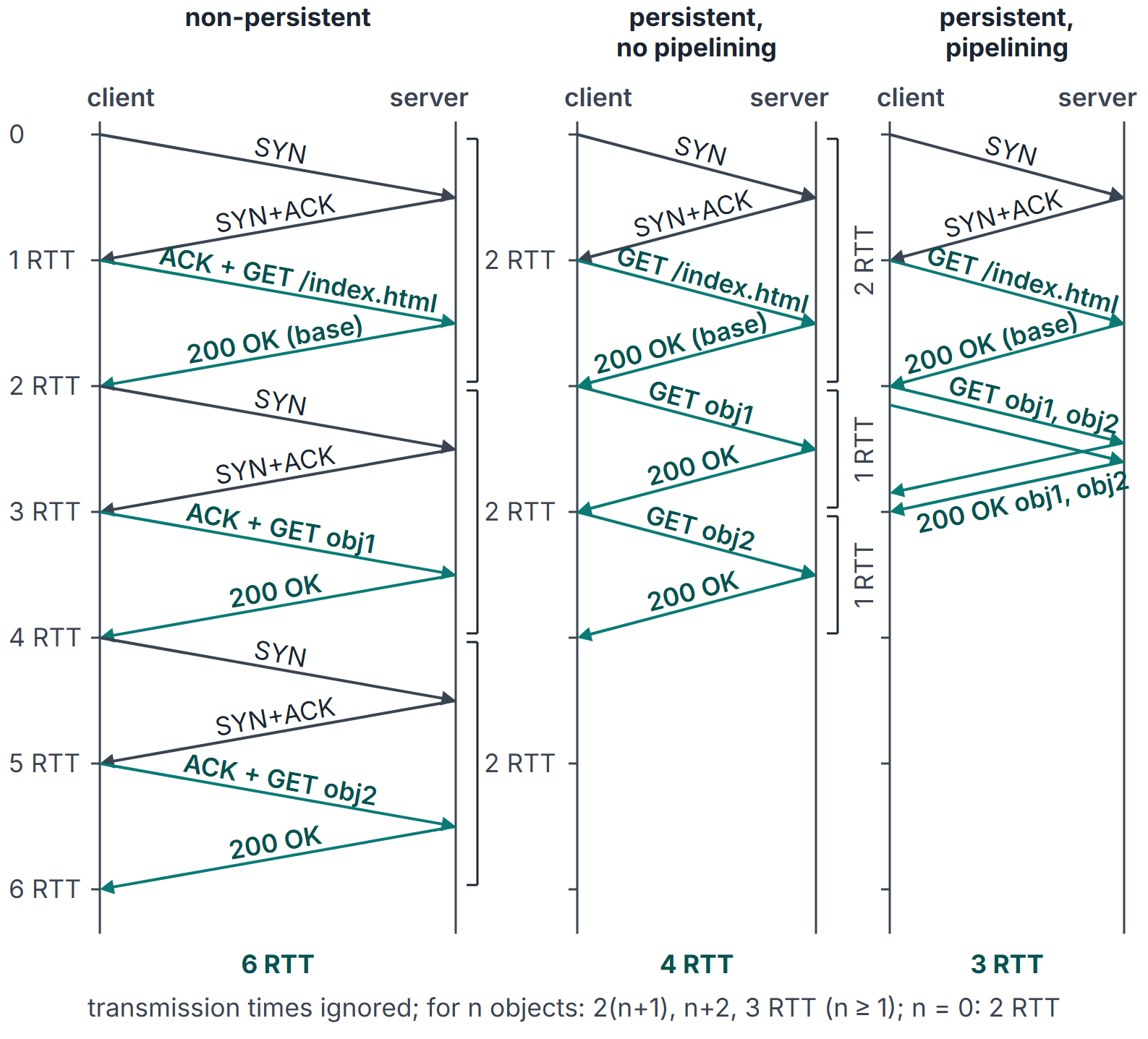
A web page is a base HTML file plus the objects it refers to (images, scripts, style sheets), each fetched by its own request. How many TCP connections those requests use is what decides most of the page's delay: non-persistent connections open a new TCP connection per object; persistent connections reuse one, optionally with pipelining. The delay of a page is counted in RTTs, together with the DNS lookup that precedes the first connection (Domain Name System (DNS)).
Prerequisites
- Transport Layer: UDP and TCP Basics: the TCP handshake and connection release.
- Domain Name System (DNS): resolving the server's name before connecting.
Core concepts
Messages
A request (HTTP/1.1 wire format):
GET /index.html HTTP/1.1
Host: www.example.com
User-Agent: demo
Connection: keep-alive
A request line (method, target, version), header fields, an empty line, then an optional body. A response:
HTTP/1.1 200 OK
Content-Type: text/html
Content-Length: 1532

(1532 bytes of HTML)
The Host field is mandatory in HTTP/1.1; it lets one IP address serve many sites. Content-Length (or chunked transfer coding) tells the client where the body ends, which is what makes reusing the connection possible.
Methods
| Method | Purpose | Safe | Idempotent |
|---|---|---|---|
| GET | Retrieve a representation | Yes | Yes |
| HEAD | Like GET, headers only | Yes | Yes |
| POST | Send data for the resource to process | No | No |
| PUT | Replace the resource with the body | No | Yes |
| DELETE | Remove the resource | No | Yes |
Safe means the request is not meant to change server state; idempotent means repeating it has the same effect as sending it once.
Status codes
| Class | Meaning | Examples |
|---|---|---|
| 1xx | Informational | 100 Continue |
| 2xx | Success | 200 OK, 204 No Content |
| 3xx | Redirection | 301 Moved Permanently, 304 Not Modified |
| 4xx | Client error | 400 Bad Request, 403 Forbidden, 404 Not Found |
| 5xx | Server error | 500 Internal Server Error, 503 Service Unavailable |
State and caching
- Cookies. The server sends
Set-Cookie; the client returns the value inCookieon later requests, so the server can link them. - Conditional GET. A cache holding a copy sends
If-Modified-Since(orIf-None-Match); the server answers 304 Not Modified with no body if the copy is still valid.
Persistent and non-persistent connections
| Mode | Connections for a page with objects | Behaviour |
|---|---|---|
| Non-persistent | Each object: new TCP connection, one request, server closes | |
| Non-persistent, parallel | Up to connections at once after the base file | |
| Persistent, no pipelining | 1 | Next request sent after the previous response arrives |
| Persistent with pipelining | 1 | All object requests sent back to back |
HTTP/1.1 connections are persistent by default; Connection: close asks for the connection to be closed after the response. Pipelining is allowed by HTTP/1.1 but responses must come back in request order; browsers rarely enabled it, and HTTP/2 replaced it with multiplexed streams.
Mathematical explanation: RTT counting
Ignore transmission times, and assume the request rides on the third segment of the handshake. Fetching one object on a new connection costs 2 RTT: one for the handshake, one for request and response. For a base page and referenced objects:
Add the DNS lookup time once, before the first connection, unless the address is cached. With object transmission times , add them to each object's fetch (or once per pipelined batch on a single bottleneck).
Worked examples
Example 1: four ways to load a page
A base file and 10 objects; RTT = 50 ms; transmission times ignored; the server's address is cached.
| Mode | RTTs | Time |
|---|---|---|
| Non-persistent, serial | 1100 ms | |
| Non-persistent, 5 parallel | 300 ms | |
| Persistent, no pipelining | 600 ms | |
| Persistent, pipelining | 150 ms |
Example 2: adding DNS
The same page, with the DNS lookup from the DNS note (92 ms with an empty cache): persistent without pipelining takes ms. A second visit with the address cached takes 600 ms.
Example 3: counting connections
With non-persistent HTTP a page of 1 base file and 10 objects opens 11 TCP connections and therefore performs 11 handshakes; with persistent HTTP, one. Each non-persistent connection also leaves the closing side (normally the server) in TIME-WAIT.
Example 4: a conditional GET
A cache holds /logo.png, last modified on a known date. It sends GET /logo.png with If-Modified-Since set to that date. If unchanged, the server returns 304 Not Modified with no body: one round trip and no object transfer.
Example 5: including transmission time
A base file and 4 objects, RTT 20 ms, each file taking ms to transmit; the server's link sends one object at a time and requests are small.
| Mode | Time |
|---|---|
| Non-persistent, serial | ms |
| Persistent, no pipelining | ms |
| Persistent, pipelining | ms |
With pipelining the four responses leave back to back, so their transmission times add up but only one RTT is paid for them. Setting gives back 10, 6 and 3 RTT.
Related material. SMTP and FTP message counts
- SMTP (mail transfer, TCP port 25). After the TCP connection the server greets (220); the client sends EHLO (250), MAIL FROM (250), one RCPT TO per recipient (250 each), DATA (354), the message ending with a line containing only "." (250), and QUIT (221). One message to one recipient: 5 commands plus the message, and 7 server replies; each extra recipient adds one RCPT TO and one reply. SMTP only pushes mail (from the sender's agent to its server, and between servers); the recipient's agent fetches mail from its server with a mail access protocol, POP3 on TCP port 110 or IMAP on TCP port 143.
- FTP (file transfer). A control connection to server port 21 stays open for the whole session and carries commands and replies; every file transfer or directory listing uses a separate data connection, opened for that transfer and closed after it (from server port 20 in the default active mode). A session that lists a directory and fetches 3 files uses 1 control and 4 data connections: 5 TCP connections. Because commands travel outside the data connection, FTP is said to send control information out of band; HTTP sends it in band.
Important properties and observations
- Stateless protocol, stateful applications: cookies and server-side sessions carry state over a stateless protocol.
- Text headers in HTTP/1.1, binary framing in HTTP/2 and HTTP/3; methods and status codes are the same.
- Connection reuse is the main latency lever for many small objects; parallel connections are the other.
- HTTP over TCP depends on TCP's slow start too: a new connection starts with a small congestion window (TCP Congestion Control).
Common misconceptions.
- "HTTP/1.1 is non-persistent by default." HTTP/1.0 was; HTTP/1.1 is persistent unless
Connection: close. - "One object costs one RTT." On a new connection it costs two.
- "Pipelining lets responses come back in any order." In HTTP/1.1 they come in request order.
- "HTTP keeps state about the client." The protocol does not; cookies make the client send it.
- "FTP sends files over port 21." Port 21 is the control connection; data uses separate connections.
GATE examination perspective
- RTT counting. 2 RTT per object on a new connection; 1 RTT per object on a persistent one; pipelining folds all object requests into one RTT.
- DNS first. Add the resolution time once if the address is not cached.
- Parallel connections. rounds of 2 RTT after the base file.
- Methods and status codes. GET, POST, HEAD, PUT, DELETE; 200, 301, 304, 404, 500.
- Connections per application. HTTP persistent 1; non-persistent ; FTP 1 control plus 1 per transfer.
Summary
Sources
- A. S. Tanenbaum, D. J. Wetherall, Computer Networks, 5th ed., Pearson, 2011: Sections 7.3.4 (HTTP) and 7.2.4 (Message Transfer: SMTP).
- J. F. Kurose, K. W. Ross, Computer Networking: A Top-Down Approach, 8th ed., Pearson, 2021: Sections 2.2.1 to 2.2.5 (The Web and HTTP: non-persistent and persistent connections, message format, cookies, Web caching), 2.3.1 (SMTP) and 2.3.3 (Mail Access Protocols).
- B. A. Forouzan, Data Communications and Networking, 5th ed., McGraw-Hill, 2013: Chapter 26 (Standard Client-Server Protocols).
- R. Fielding, M. Nottingham, J. Reschke (Eds.), RFC 9110, HTTP Semantics, 2022, Sections 9.3 (Method Definitions) and 15 (Status Codes), (consulted 2026-11-11).
- R. Fielding, M. Nottingham, J. Reschke (Eds.), RFC 9112, HTTP/1.1, 2022, Sections 9.3 (Persistence) and 9.3.2 (Pipelining), (consulted 2026-11-11).
- J. Klensin, RFC 5321, Simple Mail Transfer Protocol, 2008, Sections 3.3 (Mail Transactions), 4.5.4.2 (port 25) and Appendix D.1 (a typical transaction), (consulted 2026-11-11).
- J. Myers, M. Rose, RFC 1939, Post Office Protocol - Version 3, 1996, Section 3 (Basic Operation: TCP port 110), (consulted 2026-11-11).
- A. Melnikov, B. Leiba (Eds.), RFC 9051, Internet Message Access Protocol (IMAP) - Version 4rev2, 2021, Section 2.1 (Link Level: port 143), (consulted 2026-11-11).
- J. Postel, J. Reynolds, RFC 959, File Transfer Protocol (FTP), 1985, Sections 3.2 (Establishing Data Connections: data port L-1 = 20) and 8 (Connection Establishment: port 21), (consulted 2026-11-11).