
Introduction
A file is a named collection of related information kept on secondary storage. To the user it is the smallest unit of storage: data reach the disk only inside files. The file system gives files names, organises them in directories, controls who may use them, and maps them onto blocks of the storage device.
Programs and users see file attributes and operations, access methods, directory structures from single-level to general graphs, links, path resolution, mounting and protection. Behind open(), the kernel keeps the per-process and system-wide open-file tables. How files are laid out on disk, and how free space is tracked, is in File Allocation Methods and Free-Space Management.
Prerequisites
- Operating System Structure and System Calls: system calls such as
open,read,writeandclose, and the trap into the kernel that each one makes.
Core concepts
File attributes
| Attribute | Content |
|---|---|
| Name | The human-readable name, the only attribute kept in human form |
| Identifier | A unique number inside the file system (the inode number in UNIX) |
| Type | Needed by systems that support several types |
| Location | Pointer to the device and the blocks of the file |
| Size | Current size in bytes or blocks, and possibly the maximum |
| Protection | Who may read, write, execute |
| Times and owner | Creation, last modification, last access; owner and group |
In UNIX-like systems everything except the name is kept in the file's inode (index node); the directory entry maps a name to an inode number. In FAT-style systems the attributes sit in the directory entry itself.
File operations and the open-file tables
The basic operations are create, write, read, reposition within the file (seek), delete and truncate, plus open and close. open() searches the directory once, copies the file's control block into memory and returns a small integer (a file descriptor); later calls use that descriptor instead of searching by name again.
Three in-memory tables support this:
| Table | One per | Holds |
|---|---|---|
| Per-process descriptor table | Process | Descriptor flags and a reference to an open file description |
| System-wide open file descriptions | System | Each independent open has an offset, access/status flags and a reference count; it refers to an inode/FCB |
| Inode/FCB table | System | File identity, metadata and disk-block locations, shared by descriptions of the same file |
Independent opens of the same inode create separate descriptions and therefore independent offsets. fork() and dup() share a description, offset and status flags, increasing its reference count. Closing one descriptor drops that reference; the description is released when no references remain, not simply on every close of the file identity.
File locks. A shared lock lets several readers in; an exclusive lock admits one writer. With mandatory locking the OS enforces the lock on every access; with advisory locking, programs must check it themselves (UNIX uses advisory locks by default).
File types
Systems recognise types by extension (.c, .o, .exe) or by a magic number at the start of the file (UNIX executables and scripts). The OS uses the type for executables and archives; for other files the type is mostly a convention kept by applications.
Access methods
| Method | Model | Typical use |
|---|---|---|
| Sequential | Read or write the next record and advance the pointer; rewind | Editors, compilers, logs |
| Direct (relative) | Read or write record in any order; the file is a numbered sequence of fixed-size blocks or records | Databases, lookup tables |
| Indexed | An index file maps keys to record positions; search the index, then read directly | Large keyed files (index on an index for very large files) |
For direct access with fixed-size records of bytes packed into blocks of bytes, without letting a record span two blocks, each block holds records, and record (counting from 0) is in block .
Example. Records of 120 bytes in 4,096-byte blocks: records per block, with 16 bytes unused at the end of each block. Record 1,000 is in block , at position 14 within the block, both counted from 0.
Directory structures
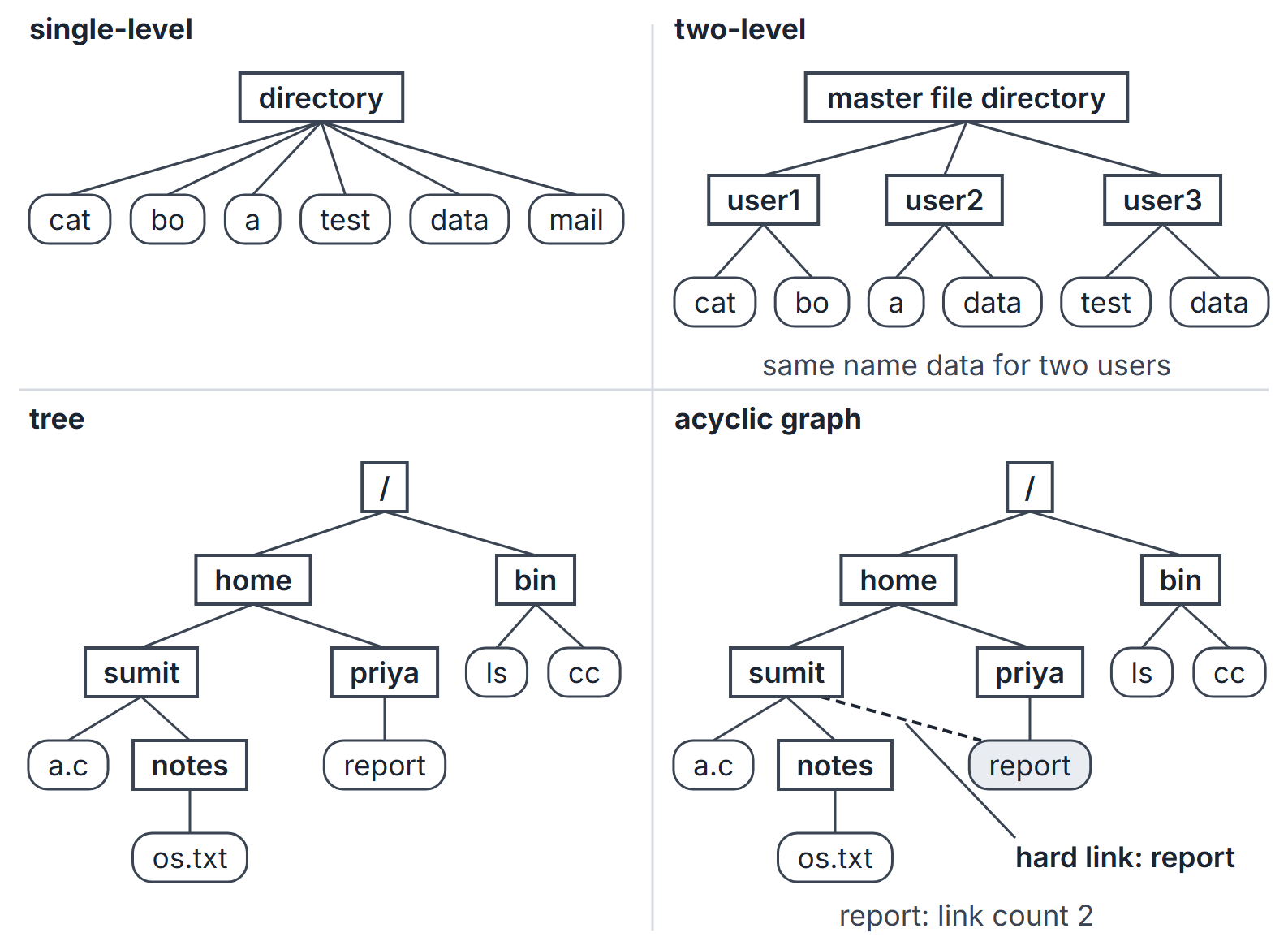
| Structure | Idea | Strength | Weakness |
|---|---|---|---|
| Single-level | One directory for all files of all users | Simple | Names must be unique system-wide; no grouping |
| Two-level | A master file directory (MFD) with one user file directory (UFD) per user | Users isolated; same name allowed for different users | No grouping within a user; sharing needs full path names |
| Tree | Directories may contain subdirectories; every file has a unique path from the root | Grouping, natural naming | No sharing of one file between two directories |
| Acyclic graph | A file or subdirectory may appear in several directories, via links | Sharing | Several names for one file; deletion needs care |
| General graph | Links may create cycles | Most flexible | Searches can loop; unreachable cycles need garbage collection |
Path names
An absolute path starts at the root (/home/sumit/notes/os.txt); a relative path starts at the current working directory (from /home/sumit, the same file is notes/os.txt). The entries . and .. name the directory itself and its parent.
Links and sharing
- A hard link is a second directory entry holding the same inode number. The inode keeps a link count; deleting a name decrements it, and the file's blocks are freed only when the count reaches 0 (and no process has it open). Hard links to directories are normally forbidden, which keeps the graph acyclic, and they cannot cross file systems.
- A symbolic (soft) link is a small file whose content is a path. Resolving it means following that path. It does not change the target's link count, it can cross file systems and point to directories, and if the target is deleted it is left dangling.
Example. Create f (link count 1). ln f g adds a hard link (count 2). ln -s f s creates a symbolic link (count still 2). rm f removes one name (count 1): the data survive and are still reachable as g, but s now dangles and opening it fails.
General graphs
If links may create cycles, a traversal must remember visited directories or it may never end, and a cycle that is no longer reachable from the root keeps nonzero link counts although nobody can reach it, so its space can be reclaimed only by garbage collection (mark everything reachable, free the rest), which is very slow on a large disk. Forbidding links to directories, or checking for a cycle whenever a link is added, avoids this.
Mounting
A file system must be mounted before use: attached at a mount point, an existing directory in the already-accessible tree. After mount /dev/sdb1 /mnt/usb, the root of the new file system appears as /mnt/usb, and whatever the directory held before is hidden until the file system is unmounted (Silberschatz 15.2).
Algorithms: resolving a path
Assume an ordinary path with no symbolic links, mount crossings or extra metadata operations, and all intermediate components directories. Nothing is cached, every directory fits in one block, and reading an inode or a block costs one disk access each. For a symbolic link, expand its target and count the extra traversal and any symlink-content reads separately.
RESOLVE(path):                       -- path = /c1/c2/.../ck
    ino <- read inode of the root            -- 1 access
    for each component c in c1, ..., ck
        dir <- read the directory block of ino   -- 1 access
        find c in dir, giving inode number n
        ino <- read inode n                      -- 1 access
    return ino
A path of components needs accesses to reach the file's inode. For /home/sumit/notes/os.txt () that is 9 accesses, and reading the first data block makes 10. If the root inode is already in memory, as it usually is, subtract 1. Real systems cache directory entries and inodes, which removes most of these accesses.
Directory implementation
- Linear list of (name, inode number) entries: simple, but a lookup is a linear search, and creating a file must first search for a duplicate name.
- Hash table on the name: lookups in close to constant time; needs a collision strategy and a fixed or growable table size.
Example. Directory entries of 32 bytes in 4 KB blocks: 128 entries per block. A directory of 1,000 files fills 8 blocks (7 full, the last with 104 entries). A lookup of a name that is absent reads all 8 blocks; a lookup of a present name, every name equally likely, reads on average blocks.
Protection
Access can be controlled per operation: read, write, execute, append, delete, list. An access-control list (ACL) names, for each file, the users and their permitted operations; it is precise but long. UNIX condenses it to three classes, owner, group and others, with three bits each, read (4), write (2) and execute (1).
| Octal | Bits | String |
|---|---|---|
| 754 | 111 101 100 | rwxr-xr-- |
| 640 | 110 100 000 | rw-r----- |
| 711 | 111 001 001 | rwx--x--x |
For a directory, read permits listing the names, write permits creating and deleting entries, and execute (search) permits using the directory in a path. Deleting a file therefore needs write and execute permission on the directory, not on the file. In a sticky directory such as /tmp, an unprivileged user can delete or rename an entry only if they also own the file or the directory (Linux inode(7); chmod(1)); a privileged process (root, or one with CAP_FOWNER on Linux) can still do so.
Important properties and observations
- A name maps to an inode; all other attributes are in the inode, so one file can have several names.
open()pays the directory search once; the descriptor indexes the per-process table, whose entry points into the system-wide table.- The file pointer belongs to an open instance, not to the file.
- Hard links share an inode and keep the file alive; symbolic links store a path and can dangle.
- Tree directories forbid sharing; acyclic graphs allow it; general graphs need cycle control or garbage collection.
Common misconceptions.
- "Deleting a file frees its blocks." Only when the link count reaches 0 and no process still has it open.
- "A symbolic link increments the link count." It does not; only hard links do.
- "Write permission on a file is needed to delete it." Deletion modifies the directory, so write and execute permission on the directory are what matter (and, in a sticky directory, ownership of the file or of the directory, unless the process is privileged; Linux inode(7)).
GATE examination perspective
- Link-count traces. Track the inode's link count through
ln,ln -sandrm; decide which names still work. - Path resolution counts. State what is cached; each component costs a directory read and an inode read.
- Permission strings. Convert between octal and
rwxper class; remember the directory rules. - Direct-access arithmetic. Records per block by floor division when records do not span blocks; block and position of record .
- Directory structure properties. Which structures allow same names for different users, sharing, or cycles.
Summary
Sources
- A. Silberschatz, P. B. Galvin, G. Gagne, Operating System Concepts, 10th ed., Wiley: Chapter 13 (13.1 File Concept, 13.2 Access Methods, 13.3 Directory Structure, 13.4 Protection); Chapter 14 (14.3 Directory Implementation); Chapter 15 (15.2 File-System Mounting).
- A. S. Tanenbaum, H. Bos, Modern Operating Systems, 4th ed., Pearson: Chapter 4 (4.1 Files, 4.2 Directories, 4.3.3 Implementing Directories, 4.3.4 Shared Files).
- Linux man-pages, inode(7) and chmod(1), consulted 2026-11-11: the sticky bit (S_ISVTX) on a directory (https://man7.org/linux/man-pages/man7/inode.7.html, https://man7.org/linux/man-pages/man1/chmod.1.html).